
Choosing a Universal Board Tv can look simple until a replacement board meets a different panel, connector, or firmware. A board may power on yet still produce no picture, incorrect colors, or unsupported features. Small details matter. For global buyers, regional tuner standards, input voltage, component availability, and after-sales support can also change the real cost of a purchase.
The need for dependable repairs is set against a growing electronics-waste challenge. The Global E-waste Monitor 2024, published by UNITAR and the International Telecommunication Union, reports that the world generated 62 million tonnes of e-waste in 2022; only 22.3% was documented as formally collected and recycled. Replacing a compatible board may help keep a television in service, but it is not automatically the best fix. Panel faults, damaged power supplies, and unavailable firmware can make replacement impractical. That is not enough. Buyers should verify the full model number, panel code, board revision, supported resolution, and firmware before ordering. This guide compares seven widely available universal-board options by compatibility evidence, practical features, documentation, and seller support. Specifications can change between production batches, and “universal” does not mean compatible with every television. Check twice. A careful match is usually worth more than a low price.
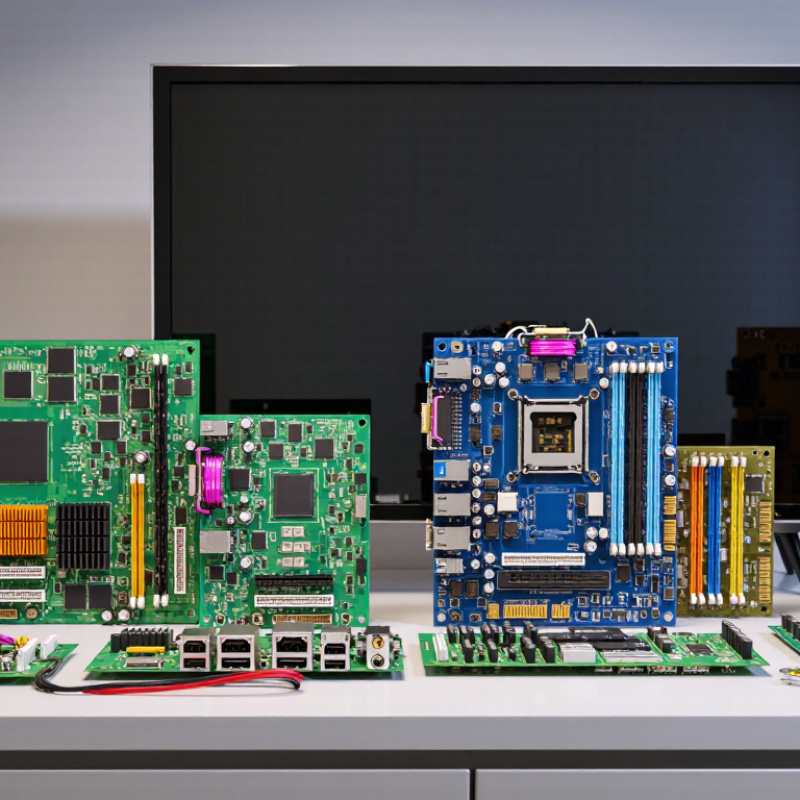
A universal TV board is a replacement control board designed to work with a range of television panels. It can restore functions such as picture processing, input selection, audio control, and remote response. But “universal” does not mean every board fits every screen. Not quite universal.
Before choosing a board, a repairer should check the panel’s model label, resolution, connector type, and operating voltage. The board’s firmware and display interface must also match the panel. A mismatch may cause a blank screen, incorrect colors, or no backlight control. Small details count. For example, two similar-looking ribbon connectors can carry different signals. In practical repairs, recording cable positions and photographing the original setup can prevent avoidable mistakes. I would not rely on cabinet size alone; it’s an easy assumption to make, and it can be wrong.
The board’s role is only one part of diagnosis. A failed display may instead involve a power supply, damaged cable, or panel fault. Unplug the television before inspection, and leave electrical testing to someone trained to handle retained voltage safely. A careful compatibility check usually saves more time than replacing parts by guesswork. Even then, results can vary.
A universal TV board can look like a simple fix, but “universal” rarely means plug-and-play. Compatibility depends on the screen panel, connector layout, resolution, and the original board’s firmware. A 40-inch panel may use a different timing interface from another panel of the same size. Check the panel label and photograph every connector before ordering. A small mismatch can leave the screen blank or produce a distorted image.
Regional differences matter too. TV tuners and signal standards vary, while menus, voltage requirements, and remote-control functions may differ by model. Compare the replacement board’s supported panel list with the exact panel code, not only the television’s model number. If that list is incomplete, ask the supplier for written confirmation. It is easy to overtrust a product listing; compatibility claims can be vague, and that deserves a closer look.
Tips: Match the panel code, connector type, and resolution first. Check input voltage and tuner support for your region. Keep the original board until the replacement is tested. Take clear photos before disconnecting cables. That matters. A careful check now can save a second order and an avoidable repair delay.
A TV board’s tuner must support the broadcast standard and channel bandwidth used in its target region.
Values show channel bandwidth in MHz. DVB-T/T2 uses 6, 7, or 8 MHz channels depending on the country; the chart shows its 8 MHz option. Confirm regional tuner support before selecting a replacement board.
A universal TV board is a practical replacement option, but “universal” does not mean every board fits every screen. Global buyers can compare seven useful types:
Check twice.
Before ordering, read the panel label and record its resolution, backlight voltage, connector type, and pin count. LVDS and eDP connections are not interchangeable, even when the plugs look similar. Confirm the board’s firmware supports the panel, and check whether its tuner matches the signal format used in the destination market. A seller’s compatibility table is useful, but a clear photo of the original board can reveal details a listing leaves out.
Price matters, yet a low-cost board may require separate cables, a remote, or firmware setup. Ask for a wiring diagram and a return policy before purchase. One detail is easy to miss: mounting holes can differ between otherwise compatible boards. These checks reduce avoidable fit problems, though they cannot replace testing the exact panel combination.
When comparing seven universal TV boards, start with panel output, not the word “universal.” Check LVDS or eDP support, resolution, timing, connector pins, and panel voltage. Then compare HDMI, USB, AV, and tuner inputs against your devices. The HDMI Forum’s HDMI 2.1 specification sets a maximum link rate of 48 Gbps and supports 4K at 120 Hz. That performance requires the board, panel, and firmware to support it together. A feature list alone is not proof.
Tips: Photograph the original board’s connectors and labels before ordering. Match the panel model and voltage, then confirm the firmware supports the panel timing. Small details matter.
For global buyers, compare tuner standards such as DVB-T2, ATSC, or ISDB-T with the target market’s broadcast system. USB versions also differ: USB-IF’s USB 3.2 specification lists 5 Gbps for Gen 1, while USB 2.0 is limited to 480 Mbps. The same socket shape can hide different speeds. I still find this easy to miss. Ask sellers for a clear pinout, supported resolutions, and input list; “universal” often has limits.
Choosing a universal TV board starts with the exact panel model, not screen size. Check the panel’s resolution, refresh rate, connector type, pin count, and operating voltage. Two panels of the same size may use different wiring. Omdia’s 2024 TV market outlook estimated global shipments at about 208 million units, reflecting the variety of hardware buyers may encounter. That scale makes careful matching essential. Small details matter.
Disconnect the television from power before opening its case, and photograph each cable before removal. Match connectors carefully; never force a plug into place. A board may also require panel-specific firmware or settings for scan direction and backlight control. After installation, check the image for flicker, incorrect colors, or unusual heat. A compatibility chart is useful, but it is not proof: listings can omit revisions. If the panel label or wiring is unclear, ask a qualified technician rather than guessing. Safety first.
“Universal” TV boards are not universally compatible. The right choice depends on the panel, its electrical specifications, the display interface, and the board’s firmware. The options below describe common board categories and their typical uses; verify the exact board documentation before purchase or installation.
| Board category | Typical display use | Common features | Best suited for | Compatibility checks |
|---|---|---|---|---|
| LVDS LCD controller board | LCD panels that use an LVDS interface; supported resolutions depend on the board and panel. | Often includes HDMI and other video inputs; some versions have a TV tuner. | Replacing a controller for a compatible LVDS LCD panel. | Panel model, LVDS pin count, connector, signal mapping, voltage, and firmware configuration. |
| eDP LCD controller board | LCD panels built with an eDP interface; resolution and refresh-rate limits are board-specific. | Video inputs vary; some designs provide audio outputs or a remote-control receiver. | A compatible eDP panel conversion or repair project. | eDP connector and lane configuration, panel voltage, timing data, and supported resolution. |
| HD-ready TV main board | Typically intended for compatible 720p-class or 1366 × 768 panels; exact support varies. | May combine video processing, audio control, input selection, and a regional tuner. | Basic television repairs where the panel and board specifications match. | Panel timing, backlight type, tuner standard, firmware, and cable pinout. |
| Full-HD TV main board | Designed for compatible 1920 × 1080 panels; not every board supports every panel timing. | Input selection and audio features vary; some versions include digital TV reception. | Full-HD panel repairs and conversions with verified electrical compatibility. | Panel interface, refresh rate, voltage, backlight control, and firmware settings. |
| 4K UHD TV main board | For compatible 3840 × 2160 panels; input bandwidth and supported refresh rates vary by board. | May support high-bandwidth video inputs, but feature support depends on the specific design. | Repairs or conversions requiring a compatible 4K panel controller. | Panel interface and timing, input bandwidth, refresh rate, firmware, and power requirements. |
| Universal main board with regional tuner options | Panel support depends on the selected interface and the board’s configured firmware. | May be offered with tuner variants for different broadcast systems; tuner support is not interchangeable by assumption. | Buyers who need local over-the-air or cable reception as well as external video inputs. | Country’s broadcast standard, tuner version, channel band, firmware, and panel compatibility. |
| HDMI-to-panel controller kit | A compatible LCD panel driven from an HDMI source; resolution is limited by the controller and panel. | Usually focused on external video input; a TV tuner or smart-TV functions may not be included. | Monitor-style conversions, test setups, or projects using an external streaming device. | Exact panel model, interface, connector, power supply, and whether audio or backlight control is included. |
Compatibility note: “Universal” generally means configurable for a range of supported panels, not compatible with every television. Confirm the board revision, firmware, panel specifications, and included accessories with the seller before ordering.
To learn more about any of the products and services provided by Abbott Ball Company, Inc., simply complete the form below.